
Chipotle Nutrition Calculator
Build your custom Chipotle order below and see calories, protein, carbs, fat, sodium and fiber update instantly.
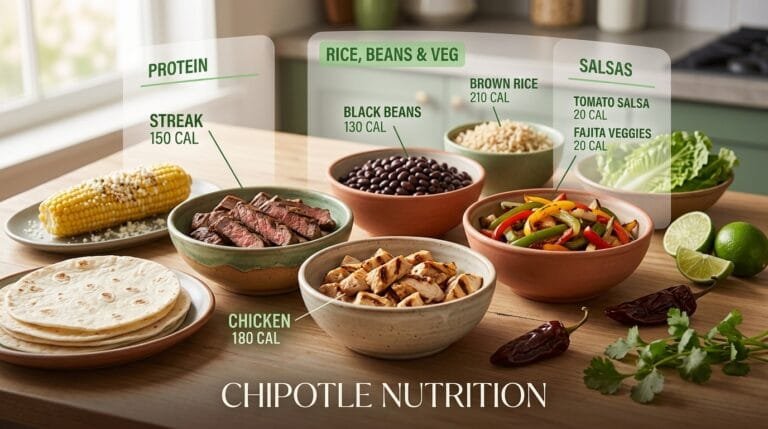
Select the exact ingredients in your bowl, burrito, salad or tacos to get an estimated nutrition breakdown. Values are based on Chipotle's publicly available per-serving nutrition figures. Actual restaurant portions can vary.
Nutrition Facts
What Is the Chipotle Nutrition Calculator?
Created to provide a precise breakdown of your
This Chipotle meal before you even step into the restaurant, the Chipotle Nutrition Calculator is a free online tool to help you choose the right meal for your needs.You can create your meal one item at a time and get an instant estimate of the calories your burrito bowl or burrito will contain, starting with the base to the final drizzle of sauce.
This calculator is designed to look like Chipotle's actual menu, allowing you to choose a base, a protein, beans, toppings, salsas, and extras just as you would if you were at the counter.
All selections will update your running totals as you go, including calories, protein, carbohydrates, fat, sodium, and fiber. Just looking for the answer to what exactly goes into your favorite order at Chipotle? Or are you on a macronutrient counting mission for a fitness objective, medical need, or just plain interest? This tool will help do away with the guesswork.
Why Use a Chipotle Calorie Calculator?
It is a good thing that Chipotle offers customization because it really is difficult to know the exact nutrition numbers without something like this.
Just a few additional scoops of guacamole or double serving of rice can fill up a meal that appeared healthy, but really is hundreds of calories above the count. People use this This Calculator prior to ordering for reasons:
See your real calorie count. A loaded burrito can range anywhere from 600 to over 1,200 calories depending on what you add, and this tool shows you exactly where you land.
Track your macros accurately. If you're following a high-protein, low-carb, keto, or calorie-deficit plan, you can adjust ingredients until the numbers match your targets.
Plan meals around dietary needs. Whether you're managing sodium intake, avoiding dairy, or eating gluten-free, you can test combinations and see the nutritional impact instantly.
Compare menu options side by side. Curious whether a bowl or a burrito is lighter? Or whether chicken beats steak for your goals? You can test both in seconds.
Avoid hidden calorie traps. Items like queso, sour cream, and tortillas often carry more calories than people expect, and seeing the numbers helps you make informed swaps.
How the Calculator Works
Using the Chipotle Nutrition Calculator is simple and doesn't require any nutrition expertise. Here's the basic flow:
Pick your format. Start with a burrito, bowl, salad, or tacos.
Choose your base. Select white rice, brown rice, or skip the rice entirely for a lower-carb option.
Add your protein. Options typically include chicken, steak, barbacoa, carnitas, sofritas, or no protein at all.
Add beans, salsas, and toppings. Black beans, pinto beans, fajita veggies, cheese, lettuce, guacamole, and various salsas can all be added or removed.
Review your totals. As you build your order, the calculator updates calories, protein, carbs, fat, and other key nutrients in real time.
Because every ingredient is added individually, you can see precisely how much each item contributes to your final total, rather than relying on a generic "average meal" estimate.
Understanding Your Nutritional Breakdown
Once your meal is built, the calculator presents a full nutritional summary broken down by category. This typically includes:
Total calories for the entire meal
Protein in grams, useful for tracking muscle-building or high-protein diets
Carbohydrates in grams, including a breakdown of fiber and sugar where applicable
Total fat, including saturated fat
Sodium, which is especially useful if you're monitoring blood pressure or following a low-sodium diet
Seeing these numbers broken out, rather than just a single calorie figure, helps you understand the actual composition of your meal. Two meals can have the same calorie count but very different macro splits, and that distinction matters if you're working toward a specific health or fitness goal.
Customizing Your Order for Your Goals
The largest benefit of this calculator is that you have the option to try before you buy. You don't have to use just one combination; you can try out multiple builds until you find one that works for you. There are a number of typical customization approaches, such as:
Going lower-carb: Skip the rice and tortilla and build a salad or bowl with extra lettuce or fajita veggies instead.
Boosting protein: Add double protein or combine two protein options if you're targeting a high-protein meal.
Cutting calories: Swap sour cream and cheese for salsa, or reduce guacamole to a smaller portion.
Managing sodium: Limit high-sodium add-ons like queso and adjust salsa choices, since some carry significantly more sodium than others.
Balancing macros: Mix beans and rice in smaller portions rather than full servings to keep carbs in check while still getting fiber and texture.
Making Smarter Choices at Chipotle
Numbers are not the important thing in this tool. It is what the numbers can do. You can make small changes that make a big difference over the long haul, when you can see exactly how the bowl total will add up before you place your order.
A person on a weight loss plan may substitute white rice with additional vegetables and skip tortillas. People who are trying to build muscle may be able to have a second protein and save the rice for additional carbohydrates.
Whether you are aiming to lose weight, build muscle, promote heart health, or simply increase awareness about what you are consuming, the calculator can adjust to suit your desired goals.
Frequently Asked Questions
Q1: Does Chipotle's nutrition calculator work?
Totals are based on the same nutritional information provided by Chipotle for their menu, as used by the calculator. In-restaurant portions may differ slightly from those listed here in some cases due to how the item is scooped or served.
Q2: Is this keto or low-carb diet calculator safe to use?
Yes. Skip rice, beans, and tortillas and aim for the protein with cheese, guacamole, and fajita veggies to create a meal that works for most low-carb and keto diets.
Q3: Does the calculator take into consideration extra or double portions?
Yes, most versions let you choose standard or extra servings for items such as protein, rice, and guacamole and will adjust the amounts of these ingredients accordingly.
Q4: Does this tool have a fee for use?
Yes, the Chipotle Nutrition Calculator is free; no sign-up or account is needed.